From monitoring customer networks to service forms, warranty and RMA tracking to switch configs, projects to stock and quotes to invoices. For IT service companies in Türkiye.
No sign-up needed for the demo: a company with sample data opens in seconds. · No card required for the trial. · Product brochure (PDF)
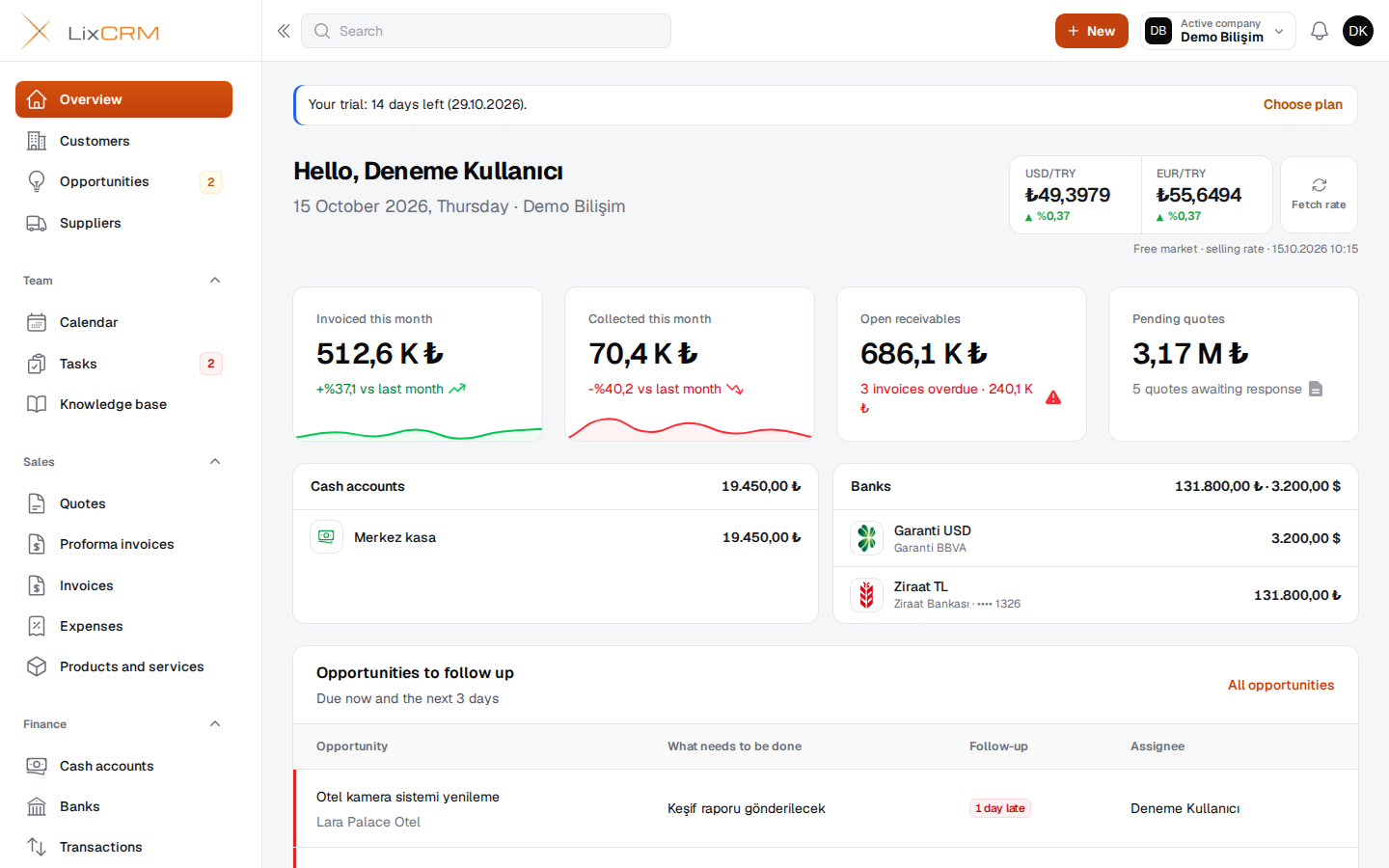
Monitor your customers' networks and link faults to service forms, devices to RMA and configs to records.
Install a small collector that checks devices on customer networks every minute with ping and SNMP; when something breaks your team gets a phone alert, and a service form can open automatically.
Fill in service forms on a tablet on site and get the customer's signature. Track devices sent for warranty with RMA and shipping info; every device you sell is under warranty by serial number.
Enter the hostname, VLANs, port assignments, trunk/uplink, management IP and users; the configuration is ready to paste into the device.
Pick your sector when you create your company: service form areas, checklists, device types and the menu follow your work. Your customer gets a reminder when periodic maintenance is due.
Alarm and camera installation, maintenance and repair; recorder and network monitoring.
AC and boiler installation, annual maintenance, repairs and warranty tracking.
Device intake, repair status, waiting for parts and handover.
Fire extinguisher refills and inspections, hose cabinet and alarm maintenance.
Mandatory monthly maintenance, per-building forms and fault records.
Periodic maintenance and load tests at hotels, hospitals and factories.
Installation, filter replacement and regular maintenance.
Periodic pest control and inspection reports for restaurants and hotels.
Weekly maintenance, measurements and reports for villa and hotel pools.
Panel and inverter installation, serial number tracking and maintenance.
Rental devices, meter readings, consumables and service.
Other businesses that send technicians or service devices.
One system instead of spreadsheets, separate programs and forgotten renewals.
Bring customers, contacts, products, customer devices, open balances and service history from Perfex CRM or Excel in one go. Do a dry run first to see how many records will be created; uploading the same file twice creates no duplicates.
The ? button on every screen opens that page's guide: step-by-step help from service forms to customer accounts, from Paraşüt to switch configs. The guides are also public on the website.
Your invoice goes to Paraşüt and the e-Invoice number comes back; purchase bills, cash/bank transactions, accounts and stock are pulled from Paraşüt. No duplicate records. XML export for Logo.
A PDF report for the customer for the period you choose: work done, first response and resolution time, SLA compliance, satisfaction and the change from the previous period. Show the value of the maintenance contract in numbers.
Connect to the customer's computer with AnyDesk, RustDesk or TeamViewer in one click from LixCRM; the time is tracked and recorded on the service form when you finish.
When the customer scans the label on the cabinet, a fault form opens without login; a ticket with photos reaches you. When a technician scans it, router, VLAN and Wi-Fi details and vault passwords open.
Write rules like "if an NVR disk is faulty for 30 minutes"; a service ticket opens and is assigned to the on-call technician, and the customer can be notified too. Weekly or daily on-call list.
The monthly customer report shows how many days of recordings are kept, disk and camera status, and how long recording stopped during the month. The value of your maintenance contract becomes visible.
Router, firewall and switch versions are read from config backups and compared with the recommended version; outdated ones count against the security scorecard and an upgrade quote is ready in one click.
Your planned switch config is compared with every backup of the device; if someone later changed a VLAN or port, you're notified. Info cards also update from the backup automatically.
Share an opportunity, project or service form with a partner who uses LixCRM; the subcontractor fills in the form on site and the signature and photos land in your record.
Select the devices going to the supplier; the shipping list PDF, cargo tracking number and email to the supplier are ready. On return, mark devices "returned" one by one.
Invoice the project partially in stages such as 30% advance, 50% installation, 20% delivery; invoiced and remaining amounts are always visible.
Sales, receivables aging, service performance, VAT, recurring revenue and stock value; cash flow for the next 13 weeks. Get any report in your inbox every month.
Upload statements from Garanti, Enpara, Vakıfbank and other banks; incoming transfers match invoices, outgoing payments match expenses, and everything is recorded in one click.
Orders split by supplier are ready from the accepted quote; send them as PDF, receive goods on arrival, and stock and supplier payables are recorded automatically.
Requests from a form added to your website with one line become opportunities; you get notified and the visitor gets an automatic reply.
Sell 10, 20 or 50-hour support packages; service time is deducted from the package, and when hours run low you get a warning and a renewal quote.
Check items for each device type such as servers, switches, UPS units and video recorders; the technician ticks them off during the maintenance visit and they appear as a table in the PDF.
Upload the distributor's Excel price list to update purchase prices; quote lines with low or negative margin get a warning.
Technicians see the day's jobs in order on their phone: directions, one-tap on my way / arrived / done, materials, photos and customer signature. Works without internet too.
When the technician sets off, the customer gets an estimated arrival and a tracking link; when the job is done, the service form and signature link, then a one-click satisfaction survey.
Technicians and days on a weekly board; drag a job to another technician or day, and overlapping jobs show in red.
Score the customer's network across 6 areas; monitoring data fills in automatically, a PDF scorecard goes to the customer and a quote is prepared from the gaps in one click.
Emails to your support address become service tickets; the customer is recognised, attachments are added as photos and replies land on the same ticket.
Which customers and technicians really make money: net profit from invoices, costs and expenses, alongside customer satisfaction.
An opportunity opens automatically for customers whose warranty or licence is about to expire; convert it to a quote and the items are ready.
Turn off the modules you don't use, let everyone arrange their own menu, and jump to any page instantly with Ctrl+K.
See who changed what and when; download all your data as Excel and PDF in a single file.
Your customers sign in with their own password to open fault reports, see their devices, warranties, quotes and invoices, approve quotes and pay invoices by card.
Scheduled maintenance visits, response time (SLA) tracking and periodic pricing; both sides sign online, and the invoice is issued and sent automatically at the start of each period.
Automatic reminders for overdue invoices, SMS or WhatsApp to the customer when the service status changes. Netgsm, İleti Merkezi, Verimor.
Every device at the customer is recorded; stick a QR label and the technician who scans it reaches the device record instantly.
Modem, firewall, NVR and server passwords are linked to the customer and stored encrypted; who viewed them and when is logged.
A PDF report to the customer at the start of every month: device availability, outages, service work and SLA.
The iPhone app is on the App Store: today's jobs, service forms, network tools and notifications. On Android, add it to your home screen and it opens like an app.
A code from an authenticator app at sign-in; the company owner can require it for the whole team.
Monitor switches, firewalls, UPS units, printers and NVRs on customer networks; get a phone alert when a device drops, a port goes down or a UPS switches to battery.
Service forms for network, CCTV and system faults; work done, materials used and the customer's signature, on a tablet in the field.
Track devices sent for warranty or maintenance with RMA, shipping and return dates; print the customer receipt form.
Put the devices you sell under warranty tracking from the invoice by serial number; get an email before expiry and link faults to a service record.
Enter VLAN, port and management settings in a form; ready-made configuration and a command reference for 6 vendors.
Staff timesheets, subcontractor progress payments, collections and payments on camera, cabling and infrastructure projects; project profit on one screen.
Purchase invoices bring materials into stock; materials used on service jobs are deducted from the technician's van. Transfers between warehouses and stock counts.
Upload the supplier's PDF or e-invoice XML; the expense, supplier, products and stock entry are created automatically.
Grouped and optional line quotes, purchase cost and margin, USD/EUR lines. Customers approve via QR or link; one click turns the quote into an invoice.
Customer and supplier balances, collections allocated to open invoices, bulk payments, opening balances and statement PDFs for reconciliation.
Never miss a domain, hosting, contract, licence or subscription expiry; a draft invoice is ready when renewal is due.
Cash and bank accounts, transfers, collections and expenses; income-expense report and account statements.
Assign tasks and get a morning agenda; service, renewal, quote and task dates in one calendar.
Procedures, installation notes and customer-specific information in one place for the team; tags, search and file attachments.
Record deals in discussion or awaiting a quote; get reminded when it is time to follow up.
Upload a statement file from a Turkish bank; transactions are matched and posted to cash and bank in one go.
With the portal, maintenance contracts and automatic notifications, customer relations run in the system, not on the phone.
Open portal accounts for your customer's staff. In the portal, which opens with your logo, they only see their own records.
Weekly, monthly or quarterly maintenance visits, a response-time commitment and period pricing. The contract document is prepared from your details.
E-mail or SMS reminders for overdue invoices, and an SMS or WhatsApp message to the customer when the service status changes. Every message sent is logged on the customer record.
One flow instead of phone calls, "where is the technician" questions and paper service forms.
Directions and calls in one tap; times are recorded automatically as they tap on my way, arrived and done. Materials used are deducted from the van stock and the customer signs on screen.
Technicians in rows, days in columns. Drag a job to another technician or day; the assigned technician is notified.
Monitored devices, backup power, warranty, switch hardening, firewall: an A–E grade across 6 areas. Monitoring data fills in automatically and the technician answers the rest.
Issue the invoice once and the e-Invoice number comes back; purchase bills, bank and stock stay the same on both sides. A periodic service report for the customer and one-click connection to a remote computer.
Your invoice is created in Paraşüt together with its customer. When you send the e-Invoice or e-Archive from Paraşüt, the official number and PDF are written to the invoice in LixCRM; the e-mail to the customer waits for the number.
Pick the period on the customer or maintenance contract page: work done, on-site visits, first response and resolution times, SLA compliance, satisfaction score and the change from the previous period are ready as a PDF. It can be e-mailed to the customer.
Stick a label on the cabinet in the server room. When the customer scans it with a phone, a form opens without login: what isn't working, a short description, a photo. The ticket reaches you instantly. When your technician scans the same label, that customer's router, VLAN, Wi-Fi and internet details open.
Decide which alarm, lasting how long, opens a service ticket. The ticket goes to that week's technician from the on-call list, and the customer can get a "your ticket was opened" message.
Hikvision and Dahua recorders are monitored; the monthly report shows retention days, disk and camera status, and how long recording stopped during the month. No "there was no recording" surprise after a break-in.
Share a service form, opportunity or project with a partner who uses LixCRM. The subcontractor records on the way, arrived and finished; customer signature and photos are written to your record and you get an email at each step.
Forward Veeam, Synology, Acronis, QNAP or Windows Server Backup report emails to your support mailbox. LixCRM matches each report to the right job and reads the result; it alerts you about failed or missing backups and can open a service form.
The meter of each leased printer is read from network monitoring every morning; on billing day a draft invoice with the fixed fee and extra pages is ready. Trips of your service vehicles come from service forms, fuel from expense receipts; inspection and insurance are reminded on time.
No more juggling a separate accounting sheet, stock list and project spreadsheet.
Add your own staff and subcontractors to camera, cabling and infrastructure jobs; record timesheets and progress payments at daily, weekly, monthly or lump-sum rates.
Upload the supplier's PDF or e-invoice XML: supplier, amounts and lines are read. Add lines to products and pick the warehouse for each one.
Issued invoices, collections, purchase invoices and payments appear on customer and supplier cards with a running balance.
Turkish VAT rates, TRY/USD/EUR lines, tax ID validation, Turkish bank statements and documents in Turkish, English or Arabic.
Once you sign up, your company is ready at app.lixcrm.com/yourcompany. Manage several companies with one user.
We take care of updates and servers. Work from your browser, phone or tablet.
Upload the statement from online banking as is. Incoming amounts are matched by invoice number, customer name and amount; outgoing payments by supplier and expenses. Confident matches come pre-selected, you confirm.
A 13-week cash flow built from open invoice due dates, maintenance contracts, renewals and expenses to pay. Plus sales, receivables aging, service, VAT, recurring revenue and stock reports.
Lines of an accepted quote are split into orders by supplier and currency. Email the order as a PDF; when goods arrive, receive them into stock and the supplier payable is recorded.
All modules free for 14 days. Then continue monthly or yearly on the plan you choose.
Payment is charged in Turkish lira at the current exchange rate.
| Compare plans | Starter | Pro | Enterprise |
|---|---|---|---|
| User | 2 | 5 | Unlimited |
| Sales | |||
| Customers, products and suppliers | Included | Included | Included |
| Quotes (grouped, optional, foreign currency), proformas, invoices | Included | Included | Included |
| Online quote approval, PDF, revisions | Included | Included | Included |
| Collections and expenses | Included | Included | Included |
| Opportunities and follow-up reminders | Included | Included | Included |
| Automatic opportunity from warranty / licence expiry | Included | Included | Included |
| Profitability report (customers and technicians) | Included | Included | Included |
| Sales, receivables, VAT, recurring revenue and stock reports; scheduled email delivery | Included | Included | Included |
| Low margin warning on quotes | Included | Included | Included |
| Website quote form | Included | Included | Included |
| Customer & supplier accounts, payment allocation and statements | Included | Included | Included |
| Two-way sync with Paraşüt: invoices and e-Invoice numbers, purchase bills, cash/bank, stock | Included | Included | Included |
| Account and sales invoice XML export for Logo | Included | Included | Included |
| Stock and projects | |||
| Stock and warehouses, transfers and counts | Included | Included | Included |
| Purchase orders and goods receipt | Included | Included | Included |
| Distributor price list upload | Included | Included | Included |
| Import incoming invoices from PDF / e-invoice XML | Included | Included | Included |
| Projects, staff timesheets, subcontractor progress payments | Included | Included | Included |
| Progress billing: partial invoices by percentage and stage | Included | Included | Included |
| Shared work: share opportunities, projects and service forms with partners | Included | Included | Included |
| Team | |||
| Tasks, notifications, morning agenda | Included | Included | Included |
| Calendar | Included | Included | Included |
| Knowledge base | Included | Included | Included |
| Customer communication | |||
| Customer portal: fault reports, quote approval, invoices | Included | Included | Included |
| Card payment of invoices from the portal (iyzico) | Included | Included | Included |
| Payment reminders (e-mail / SMS) | Included | Included | Included |
| Service status SMS / WhatsApp notification | Included | Included | Included |
| Monthly customer report (PDF) | Included | Included | Included |
| Service | |||
| Service forms and signatures | Included | Included | Included |
| My jobs today: directions, on my way / done, offline work | Included | Included | Included |
| Dispatch board | Included | Included | Included |
| Service tickets from incoming email | Included | Included | Included |
| Customer service tracking and satisfaction survey | Included | Included | Included |
| Device tracking and RMA | Included | Included | Included |
| Bulk RMA shipping, shipping list and email to supplier | Included | Included | Included |
| Warranty tracking for sold devices | Included | Included | Included |
| Customer inventory and QR labels | Included | Included | Included |
| Cabinet QR label: the customer reports faults, the technician opens technical info | Included | Included | Included |
| Password vault | Included | Included | Included |
| Maintenance contract, SLA, online signature and automatic invoicing | Included | Included | Included |
| Maintenance checklists by device type | Included | Included | Included |
| Support hour packages | Included | Included | Included |
| Customer security scorecard (score and PDF) | Not included | Not included | Included |
| Customer service (SLA) report: response, resolution time, satisfaction | Included | Included | Included |
| Remote connection (AnyDesk, RustDesk, TeamViewer), time recorded on the service form | Included | Included | Included |
| Services and finance | |||
| Domain, hosting, licence and contract tracking | Not included | Included | Included |
| Cash, bank, transfers, income-expense report | Not included | Included | Included |
| Matching bank statements with invoices and expenses | Not included | Included | Included |
| Cash flow forecast (13 weeks) | Not included | Included | Included |
| Bank statement import | Not included | Not included | Included |
| Network | |||
| SNMP network monitoring, alerts and phone notifications | Not included | Not included | Included |
| Switch config generator (6 vendors) | Not included | Not included | Included |
| Switch command reference | Not included | Not included | Included |
| Network scan and SNMP traps (instant alarms) | Not included | Not included | Included |
| Service tickets from alarms and on-call list | Not included | Not included | Included |
| Recorder (NVR) checks and monthly camera health report | Not included | Not included | Included |
| Config backup, drift alerts and firmware version tracking | Not included | Not included | Included |
| General | |||
| Phone app and notifications | Included | Included | Included |
| Two-factor authentication | Included | Included | Included |
| Turkish, English and Arabic | Included | Included | Included |
| Module on/off, personal menu, Ctrl+K | Included | Included | Included |
| Activity log and full data export | Included | Included | Included |
Prices include VAT. Payment is taken by credit card, secured by iyzico or PayTR.
No. LixCRM runs in the browser; your company's own address (e.g. app.lixcrm.com/yourcompany) is ready as soon as you sign up. It also works on phones and tablets.
No. All modules are open and free for 14 days. If you don't choose a plan when the trial ends, your data is not deleted; it becomes read-only.
No, it is entirely sample data. The demo account is only open to you, sends no email and is deleted after 24 hours.
Yes. Send a portal invitation to your contacts from the customer record; they sign in with their own password, open fault reports, see their devices, quotes and invoices, and approve quotes. The portal opens with your company's logo.
Each company's data is kept separate; the password vault and API keys are stored encrypted. You can protect sign-ins with two-factor authentication and give team members per-module permissions.
If you use Paraşüt, customers, suppliers, products, stock, incoming invoices and cash/bank transactions come over automatically through the connection. With the migration wizard you import customers, contacts, products, customer devices, open balances and service history from Perfex CRM or Excel files yourself; a ready-made template is included. Coming from other software? Export its lists to Excel or write to us.
Each company's data is kept separate, and only users invited by your company can access it.
Install the collector with one command on a machine that can reach your customers' networks (e.g. a small Linux container on Proxmox). Ready commands to enable SNMP on each brand are in the panel. Alerts go to phones, email and optionally Telegram.
The offline mode of the My jobs today screen opens without a connection. Departures, completions, materials, photos and signatures are stored on the phone and sent with their original times once you are back online.
If you choose, when the technician sets off the customer receives an estimated arrival time and a tracking link by SMS or WhatsApp; when the job is done, the service form and signature link are sent.
Yes. Upload the Excel (.xls, .xlsx) or CSV statement you download from online banking; incoming transfers are matched by invoice number, customer name and amount, outgoing payments with expenses. You just confirm.
They can call, email, open a ticket in the portal, or scan the QR label on the cabinet and report a fault with photos without logging in. Everything reaches you as a service ticket.
If your subcontractor uses LixCRM, you share the service form, project or opportunity with them; they enter on-site steps, photos and the customer signature from their own panel and it all lands in your record. Showing amounts is up to you.
If you use Paraşüt, yes: the invoice you issue in LixCRM goes to Paraşüt, you send the e-Invoice / e-Archive from Paraşüt, and the official number and PDF come back to the invoice in LixCRM automatically. Direct e-Invoice integration is on our roadmap.
From Reports → Accounting export, download the period's accounts and sales invoices as an XML file Logo can import; an Excel summary and invoice PDFs also come in one package.
Yes. When a company that signs up with the invite link on your subscription page makes its first payment, both of you get 30 free days; there is no limit.
Prepare a quote, open a service form and download an invoice PDF in the demo company. If you like it, set up your own company.